


That is exactly the gap that SEO content optimization tools are built to close. Two of the most talked-about options are NeuronWriter and Surfer SEO. Both promise to help you create content that actually ranks by looking at what is already working in search results and guiding you to match or beat it. But the way they go about it - and what they charge for the privilege - is where things get interesting.
Surfer SEO has been a favorite for agencies and professional content teams for a while now, thanks to its depth and polish. NeuronWriter has quietly built a reputation as a capable, more budget-friendly alternative that punches above its price point. Depending on your situation, one of these could be just what you need and the other could be a waste of money.
I'll break down both tools - covering features, usability, pricing, and who each one actually makes sense for - and by the end you'll have a clear enough picture to make a confident call for your own workflow.
Short Summary
NeuronWriter is generally the better choice for budget-conscious users, offering more affordable pricing with robust NLP-based content optimization, semantic analysis, and AI writing features. Surfer SEO is better suited for larger teams or agencies needing advanced SERP analysis, real-time content scoring, and deeper integrations. If cost-effectiveness and solid on-page optimization matter most, NeuronWriter wins. If you need enterprise-level features, precise keyword density tools, and a more established platform, Surfer SEO is worth the premium. For most individual bloggers and small businesses, NeuronWriter provides the best value.
What Each Tool Actually Does (And Who It's Built For)
NeuronWriter is an AI-assisted content editor that uses NLP (natural language processing) so you can write and optimize content around a target keyword- it pulls data from top-ranking pages and suggests semantically related terms to include in your content, so you can match the depth and relevance that search engines reward.
Surfer SEO takes a more data-intensive strategy- it analyzes over 500 on-page factors and compares your content against the pages already ranking for your target keyword. With over 150,000 customers, it's built around a real-time content score that adjusts as you write and edit.
Both tools want to help you rank. But they get there in different ways, and that matters depending on how you work.
NeuronWriter tends to draw freelance writers and smaller content teams who want an affordable way to produce optimized content without a steep learning curve. The interface is approachable, and the AI writing assistance means you can go from research to draft inside the same tool- it's a fit if you want to write and optimize in one location without paying agency-level prices.

Surfer SEO is more at home with agencies and in-house SEO teams who need to manage volume and accuracy. The depth of its analysis makes it a favorite for teams that want granular control over content decisions- it also integrates with tools like Google Docs and Jasper, which makes it easier to slot into an existing workflow. If you're evaluating how Surfer stacks up for larger operations, see how it compares to Clearscope for agencies managing multiple sites.
That said, the lines aren't rigid. A solo consultant running client campaigns might like Surfer for the data depth. But a mid-sized agency might find NeuronWriter's lower price point and built-in AI features more helpful for their team.
Consider what you actually need the tool for day-to-day. If most of your time goes into writing and you want optimization input baked into that process, NeuronWriter was built around that workflow. If you spend more time auditing content, managing multiple writers, or making data-backed decisions about page structure, Surfer's reporting and analysis features are built for that work. Teams scaling content production should also think carefully about how to grow AI output without running into ranking penalties.
Neither tool is universally better at this level - the right fit can depend on your team size, your budget, and how central content optimization is to your day-to-day work.
Pricing Breakdown: NeuronWriter vs Surfer SEO
The price difference between these two tools is one of the first things you'll see - and it's a big one. NeuronWriter starts at just $19 per month on its Bronze plan, which gives you 2 projects and 25 content analyses. From there, plans scale as high as $97 per month on the Diamond tier, which expands to 50 projects and 150 analyses per month.
Surfer SEO starts at $99 per month on its Essential plan. That gets you 30 articles per month and as many as 200 tracked pages. You can bring that cost down by about 20% with annual billing. But even then you're spending more than you would on NeuronWriter's highest tier.
It's also worth noting that Surfer's Rank Tracker is not included in the base price. To get it, you'll pay an extra $17 per month on top of your subscription.
| Tool | Starting Price | Key Limits | Notable Add-ons |
|---|---|---|---|
| NeuronWriter | $19/month | 2 projects, 25 analyses | - |
| Surfer SEO | $99/month | 200 pages, 30 articles | Rank Tracker +$17/month |
For freelancers, bloggers, or small teams working within a tight budget, NeuronWriter's entry-level price is hard to beat. Surfer SEO is priced more like a business tool and makes sense for agencies or in-house teams that need more volume and are already spending on a wider SEO stack.
Neither tool locks you into a long-term contract by default, which means you can test before you commit. That said, the value you get from each plan depends quite a bit on what you're actually trying to do - and that can depend on how these tools perform in practice.
Content Scoring, AI Writing, and Optimization Accuracy
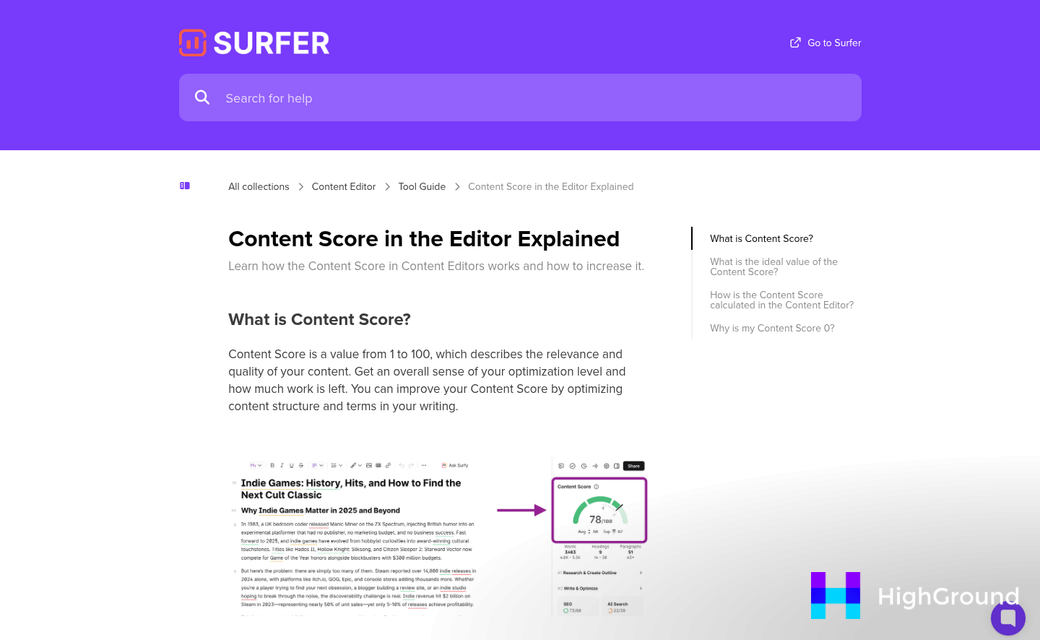
Surfer SEO's content editor gives you a live score as you write, and it pulls from over 500 on-page things to build that number. That includes things like word count, keyword density, headings, and NLP terms that seem to be in top-ranking pages - it updates in real time, so you can see your score change with each paragraph you add.
NeuronWriter takes a similar strategy but with one quirk worth mentioning. In testing, its AI writer used a target keyword 36 times in a single part of content - even though the tool's own recommendation caps usage at 5 to 10 times. The post still scored 87 out of 100.
That's worth sitting with for a bit. A score of 87 sounds great. But a keyword appearing that many times in one piece would read as unnatural to readers - it could also raise flags with search engines that look at keyword stuffing as a quality issue. The score didn't reflect that problem at all.

This seems like something that matters when picking a content tool: accuracy and reliability are not the same thing. A scoring system can be technically accurate within its own logic while still missing things that affect real-world performance. No automated score can account for how a human reader experiences your content.
Surfer's scoring is more tightly tied to competitive benchmarking - it looks at what the top-ranking pages do and tells you how close your content comes to matching those patterns; it's a helpful frame, though it does push writers to optimize toward what already ranks instead of toward what legitimately serves the reader.
Both tools use AI writing assistants to help fill in content gaps or speed up the drafting process. Surfer's AI feature integrates with its scoring system to make suggestions within the recommended range. NeuronWriter's AI is flexible and fast. But the keyword stuffing example shows it needs more human oversight to stay in check.
High scores can create a false sense of confidence if you're not reading the content you produce. Use these scores as a guide - not a guarantee - and always do a final read before publishing anything.
Workflow, Integrations, and Day-to-Day Usability
The editor experience is where these two tools start to feel very different. Surfer SEO's editor is clean and fast to load, with your content cues sitting right alongside your writing space. Everything you need is visible without much digging, which makes it easy to get into a rhythm and stay there.
NeuronWriter takes a little more time to get comfortable with. The interface has more going on, and new users sometimes spend the first few sessions just learning where things live. That said, once you know the layout, the depth of information available is helpful - especially if you like to work from content briefs.
On the integrations side, Surfer SEO connects directly with Google Docs and WordPress, which is a big deal for teams that already have a content process in place. You can write in Google Docs and run a Surfer analysis without switching tabs, which removes friction from the editing process.
NeuronWriter also has a WordPress plugin, and it works for publishing. However, it doesn't have the Google Docs integration, which can be a sticking point for teams that collaborate in shared documents. If your writers are all in Google Docs, Surfer fits more into that setup.

For a solo blogger or small content creator, NeuronWriter's pricing structure and project-based layout works well. You get functionality for the cost, and the tool was built to let you build out content plans alongside your optimization work.
For a content agency taking care of multiple clients, Surfer tends to feel more efficient. The faster editor, smoother integrations, and easy audit tools mean less time spent on setup and more time on output. At scale, that difference adds up across a full week of work.
Neither tool is right for every workflow, and that's worth keeping in mind as you make your choice. The best choice can depend on how your team works, what tools you already use, and how much time you have to spend on the learning curve before things click into place.
So, Which One Should You Actually Use?
The choice can depend on whether budget or horsepower is your bigger constraint. Budget-constrained creators get more mileage per dollar with NeuronWriter. Teams chasing scale and collaboration features will find Surfer SEO worth every cent. Neither tool is perfect. But both are legitimately helpful - and the only way to know which one clicks with your workflow is to test it on a piece of content - not a demo. Both places give you entry-level access or trial periods, so there's no reason to commit blind.
FAQs
What is the main difference between NeuronWriter and Surfer SEO?
NeuronWriter is a budget-friendly AI content editor starting at $19/month, suited for freelancers and small teams. Surfer SEO is a more data-intensive tool starting at $99/month, built for agencies and professional content teams needing deeper analysis and integrations.
Which tool is more affordable for freelancers?
NeuronWriter is significantly more affordable, starting at just $19/month. Even its highest-tier Diamond plan at $97/month costs less than Surfer SEO's entry-level Essential plan at $99/month.
Does NeuronWriter integrate with Google Docs?
No, NeuronWriter does not offer a Google Docs integration. Surfer SEO does, making it a better fit for teams that collaborate in shared documents as part of their existing content workflow.
Is NeuronWriter's content scoring fully reliable?
Not entirely. In testing, NeuronWriter's AI writer stuffed a keyword 36 times despite recommending 5-10 uses, yet still scored 87/100. This highlights that high scores don't always reflect real-world content quality or readability.
Which tool suits agencies managing multiple clients better?
Surfer SEO is generally better for agencies, offering a faster editor, Google Docs integration, and robust audit tools. These features reduce setup time and improve efficiency when managing high content volumes across multiple clients.

