


The good news is that the market has matured considerably. There are now legitimate options that won't quietly drain your margins: dedicated staging tools built specifically for agencies, to hosting places that bundle staging into plans you're probably already paying for.
This overview covers the most affordable staging services worth thinking about for agency use, what you actually get at each price point, and where the hidden costs like to show up. Whether you're running a lean two-person shop or scaling past 50 client sites, there's a setup here that fits.
Short Summary
For agency use, the cheapest WordPress staging environments include: WP Sandbox (free tier available), InstaWP (free and low-cost plans), and TasteWP (free temporary sites). For hosted solutions, Kinsta, WP Engine, and Cloudways offer built-in staging but cost more. Budget-friendly alternatives include using LocalWP (free local staging), SpinupWP (~$12/month for multiple sites), or setting up staging on cheap VPS hosting like Hetzner or DigitalOcean. For agencies managing multiple clients, InstaWP's agency plans offer the best value with automated staging creation and collaboration features.
What Agencies Actually Need From a Staging Environment
Think about how many client sites you manage right now. If the answer is more than five, a basic staging setup that works fine for solo developers will start to feel tight pretty fast.
The biggest thing agencies need is the ability to run staging for multiple sites at the same time without fighting over a single shared slot. Some hosting plans technically include staging. But they only give you one environment per account. That works for a freelancer with one active project. But it falls apart fast when you have a dozen clients in various stages of updates and redesigns.
Push-to-live functionality is another absolute must for most agency teams. You want to be able to deploy a staged version to production in one click, not through a manual file move or a sequence of steps that has to be remembered in the right order. Slow deployment can add time to every project and increases the chance of human error along the way.
Collaboration access matters more than teams sometimes account for in their hosting budget. Developers, project managers, and clients may all need to view or use a staging environment at different points. If your hosting plan only supports a single admin login for staging access, you are working around the platform instead of with it.
Clone features also come up quite a bit in agency workflows. The ability to duplicate a live site into staging, instead of building a test environment from scratch, saves a significant amount of time per project. Multiply that across ten or fifteen clients and it can add up to hours each month. If you are also managing content updates at scale, bulk updating across your entire WordPress site can save additional time during that process.
Can you see all your staging instances in one dashboard, or are you logging into separate accounts to check on each one? A scattered setup creates small inefficiencies that compound as your client list grows.
None of these things are luxuries for bigger teams. They are the baseline for a workflow that doesn't create more work than it saves. The good news is that a few affordable hosting plans have started to take agency needs seriously, and the next section looks at which ones include the most helpful staging features without a high price tag.
Cheapest Hosting Plans That Include Staging Out of the Box
A handful of hosting providers have made staging a standard feature instead of a paid add-on. That distinction matters for agencies that want to keep costs low without stitching together a separate workflow.
Hostinger is one of the most talked-about budget options. Its Business plan starts at $2.69/month and includes a one-click staging environment. The catch is that this is an introductory rate - renewal brings that as high as $10.99/month; it's still reasonable for a single site. But it adds up if you're taking care of a bigger client portfolio.
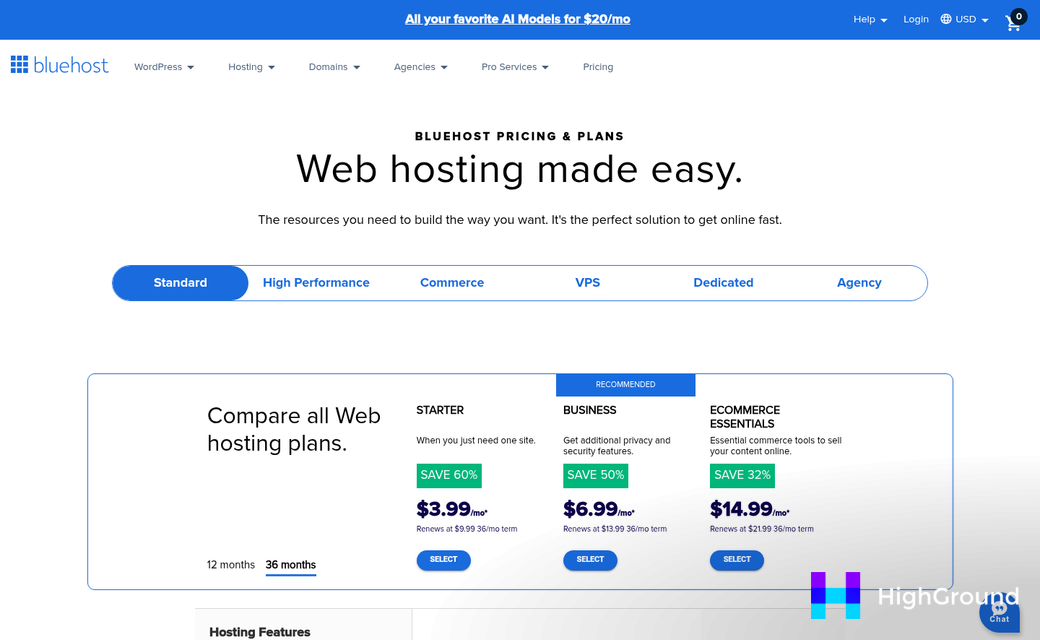
Bluehost starts from $3.79/month and also includes staging on its WordPress plans. Renewal pricing changes depending on the plan tier, so it's worth checking the exact renewal rate before you commit. The staging setup is built into the WordPress dashboard, which makes the workflow fairly easy.
InstaWP takes a different strategy altogether. Instead of traditional hosting, it gives you on-demand WordPress environments that work well as staging or development sites. Pricing starts at around $2/month per site and stays steady at renewal, which makes it easier to budget for - it's an especially good fit for agencies that spin up and tear down sites frequently instead of hosting long-term client projects.
| Provider | Starting Price | Renewal Price | Staging Included |
|---|---|---|---|
| Hostinger | $2.69/month | $10.99/month | Yes |
| Bluehost | $3.79/month | Varies | Yes |
| InstaWP | $2/month per site | Same | Yes |
The table above gives a quick side-by-side view. But look at the renewal column. Intro pricing can look very attractive and then jump considerably once the first term ends.
What each provider includes under the "staging" label also differs in practice. Some give you a full push-to-live workflow with one click. Others give you a cloned environment but leave the deployment steps to you - it's worth testing the staging flow during any trial period before you build your whole agency setup around a platform.
How Costs Stack Up When You're Managing 20 or More Sites
Per-site pricing stings when you multiply it across a full client roster. At 20 or more sites, small monthly differences become annual gaps that are hard to ignore at budget time.
Take Cloudways as a reference point. Running 25 WordPress sites there lands between $130 and $200 per month depending on your server configuration. The same workload on a premium managed host can run $400 to $700 per month; it's not a rounding error - it's a $3,000 to $6,000 annual difference for the same number of sites.
The Cloudways-versus-Kinsta comparison is worth a direct look. At 20 sites, the annual cost difference between the two platforms sits around $3,000 to $4,200 - enough to cover a part-time contractor, a year of design tools, or an actual chunk of ad spend.

| Platform | Est. Monthly Cost (20-25 Sites) | Est. Annual Cost | Staging Included? |
|---|---|---|---|
| Cloudways | $130-$200 | $1,560-$2,400 | Yes (built-in) |
| Kinsta | $400-$700 | $4,800-$8,400 | One env per site; extras cost $20/month each |
| WP Engine | $350-$600 | $4,200-$7,200 | Yes, but plan limits apply |
The staging add-on cost at Kinsta deserves a closer look: each site gets one staging environment in the plan, and any extra environment runs $20 per month. If your agency uses multiple staging environments per client - one for dev, one for client review - the cost piles up fast across 20 sites.
That's where the "cheapest per site" pitch gets slippery. A host advertising low per-site rates can still be more expensive in practice once you factor in what you actually need for the work. Agencies managing large portfolios often find that the true cost per site only becomes clear after accounting for every add-on.
It's worth doing the math for your own roster before committing to a platform. The headline price and the monthly total are not necessarily the same number. Tools like AI internal linking for WordPress can also help you get more value from whatever infrastructure you're already paying for.
When Paying More for Staging Actually Saves the Agency Money
The cheapest plan is not necessarily the one that costs the least in practice. When you factor in time spent on manual deployments, fixing broken staging environments, or explaining preview links to clients, a pricier tier can start to look like a basic trade.
Consider when a deployment goes wrong. A staging environment with reliable one-click push-to-live and built-in rollback tools can cut that recovery time from an hour to a few minutes. If your hourly rate is $75 or more, that gap pays for extra monthly spend on its own.
White-label staging URLs are another area where budget tools like to fall short. Sending a client a link with a third-party platform's name in it looks less polished than a subdomain with your agency. Some clients won't see. But the ones who do will ask questions you'd rather not answer mid-project.
Cheaper plans sometimes limit the number of users who can access staging environments or restrict who can trigger a deployment. For a solo freelancer that's fine. But a team of three or four developers will feel that friction faster.
Pressable's $135 per month plan covers 20 sites and includes staging across them with performance and support. WP Engine at $245 per month for 25 sites can add more robust developer tools and a stronger uptime track record. Neither is the cheapest option covered here. But both are worth weighing if your agency is past the early growth stage and client work is steady.
The honest question to ask yourself is what an extra $10 or $20 per month actually means against what you lose without it. If a lower-tier plan means you spend an extra hour each month untangling deployment problems, you've already lost more than you saved.
Agencies at different stages have different needs here. A newer agency watching every dollar might do fine with a leaner setup. But as the client roster grows and the margin for error shrinks, the value of a more capable staging environment grows with it.
Picking the Right Staging Setup Without Overthinking It
The choice doesn't have to be tough. How long does a push take? Does the sync feel reliable? Can your team figure it out without you holding their hand?
Pick one option, follow it for a month, and then reassess. The worst thing you can do is spend weeks overthinking it while your workflow stays broken. A good-enough staging setup you actually use beats a perfect one you're still researching.
FAQs
What is the cheapest hosting plan with staging included?
InstaWP starts at around $2/month per site with staging included, and its renewal price stays consistent. Hostinger also offers staging from $2.69/month as an introductory rate, though renewal prices rise significantly.
What staging features do agencies need most?
Agencies need multi-site staging, one-click push-to-live, site cloning, team collaboration access, and a unified dashboard. Without these, managing multiple client sites becomes time-consuming and error-prone.
How much can staging costs differ across 20 sites?
The difference can be substantial. Cloudways runs roughly $130-$200/month for 20-25 sites, while Kinsta can cost $400-$700/month for the same workload, creating an annual gap of $3,000-$6,000.
When does paying more for staging save money?
When cheaper plans lack rollback tools, reliable deployments, or team access, agencies lose billable hours fixing problems. At $75+/hour, even one saved hour per month can offset a higher hosting tier's cost.
Are introductory hosting prices reliable for agency budgeting?
No. Introductory rates often jump significantly at renewal. Always check the renewal price before committing, as the true monthly cost can be two to four times the advertised starting rate.

