

To configure Auto Fix Broken Links, go to HighGround → Settings, then click the Links tab and scroll to “Auto Fix Broken Links.”
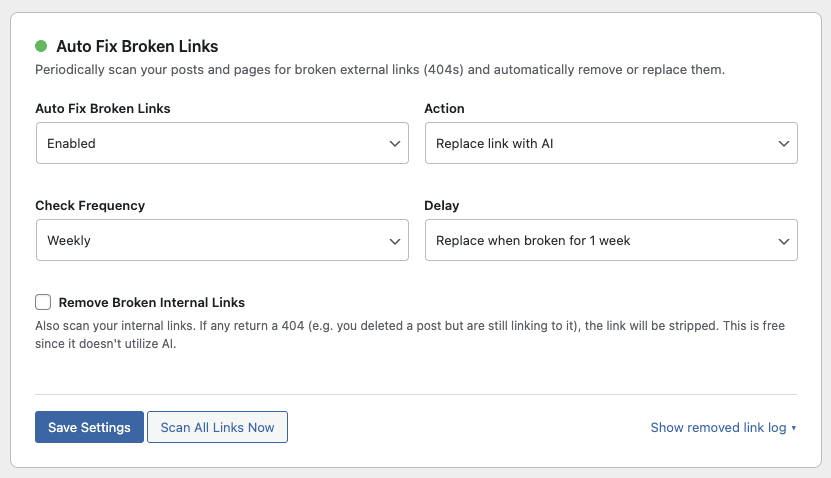
Auto Fix Broken Links is an automated maintenance feature that scans your site for outbound links that have gone dead. When a link returns a 404, HighGround can either remove it or use AI to find a working replacement - all without you lifting a finger.
Why Broken Links Matter
Broken outbound links tell search engines your content is stale and poorly maintained. They waste crawl budget, create a bad experience for readers, and quietly erode the trust signals you’ve built up over time. Most site owners don’t realize they have broken links until the damage is already done.
How It Works
HighGround runs a background scan on a schedule you choose - daily, weekly, or monthly. It checks every external link across your published posts and pages by making a quick request to each URL. If any link comes back with a 404 status code (and only a 404 - temporary server errors and redirects are ignored), it gets flagged.
What happens next depends on your Action setting:
- Remove link - The hyperlink is stripped and the anchor text is left in place as plain text. This is free and doesn’t use any AI credits.
- Replace link with AI - HighGround sends the surrounding paragraph and article title to your chosen AI provider and asks it to figure out what search term would find a suitable replacement. It then searches Google, verifies the top result isn’t also a 404, and swaps in the new URL. If the first result is dead, it works down the list until it finds one that’s live.
Delay
Not every 404 is permanent. Sometimes a site goes down for maintenance or a page is temporarily unavailable. The Delay setting lets you control how long a link has to be broken before HighGround takes action. Options are:
- Replace immediately - Act as soon as the 404 is detected.
- Replace when broken for 1 day - Wait 24 hours and check again before acting.
- Replace when broken for 1 week - Wait a full week. This is the default and is recommended for most sites, since it avoids false positives from temporary outages.
Internal Link Detection
Below the main settings, there’s a checkbox labeled “Remove Broken Internal Links.” When checked, HighGround also scans links pointing to your own site. If you’ve deleted a page or post but still have links pointing to it elsewhere on your site, those dead links get stripped automatically - no delay, no AI, no cost. The anchor text stays in place as plain text. This is a separate, free feature that runs alongside the external link scanner.
Update “Last Modified” Date
When the Action is set to “Replace link with AI,” an additional setting appears: Update “Last Modified” Date. When enabled, HighGround updates the post’s modified date after swapping in a replacement link. This signals to search engines that the content has been updated, which can trigger a recrawl so Google picks up the corrected link faster. This is enabled by default since the content has genuinely changed.
Viewing the Broken Link Log
When the feature is enabled, a “Show removed link log” link appears below the settings. Click it to expand a searchable table showing every broken link HighGround has handled. The table includes:
- Post Name - Links directly to the post editor.
- Broken Link - The original URL that returned a 404.
- Anchor Text - The text that was linked.
- Action - Whether the link was removed or replaced.
- Date/Time - When the action was taken.
Results are paginated at 10 per page with a search bar, so you can quickly find specific posts or URLs. Click “Hide removed link log” to collapse it again.
How to Enable It
Go to Settings → Links in HighGround. Scroll down to Auto Fix Broken Links and switch the dropdown from “Disabled” to “Enabled.” Choose your preferred Action, Check Frequency, and Delay, then click Save Settings.
Once enabled, you’ll see an animated status dot next to the feature title, the same indicator used by Auto Schedule and Auto Update, confirming the scanner is active.
Cost Impact
Removing links is always free. Replacing links with AI uses one AI call to determine the search keyword, plus one Google Search API call to find the replacement. Since the AI prompt is short and expects a brief response, the cost per replacement is minimal. Each replacement is logged in your Cloud dashboard under the “Edit Post” job type so you can track exactly what was spent.
Saving
Click Save Settings to apply your changes. The scanner will run on its next scheduled check based on your frequency setting. Existing broken links will be caught on the first scan. You can check the log anytime to see what’s been fixed.

